I just managed to publish Remote Desktop Gateway through Fortigate but not in a way of doing simple port forwarding but in reverse proxy concept so SSL is terminated on Fortigate and then forwarded to Remote Desktop Gateway. The cool thing is that Fortigate can now use Let’s Encrypt also with multiple subject names (also other domain names if you want (as seen in my example)) … I find it simply great that I can leverage certification renewal + extra firewall policies (like Geography) to Fortigate and let Windows Server to work only as Remote Desktop Gateway (on which I do not need to take care of certificates any more…).
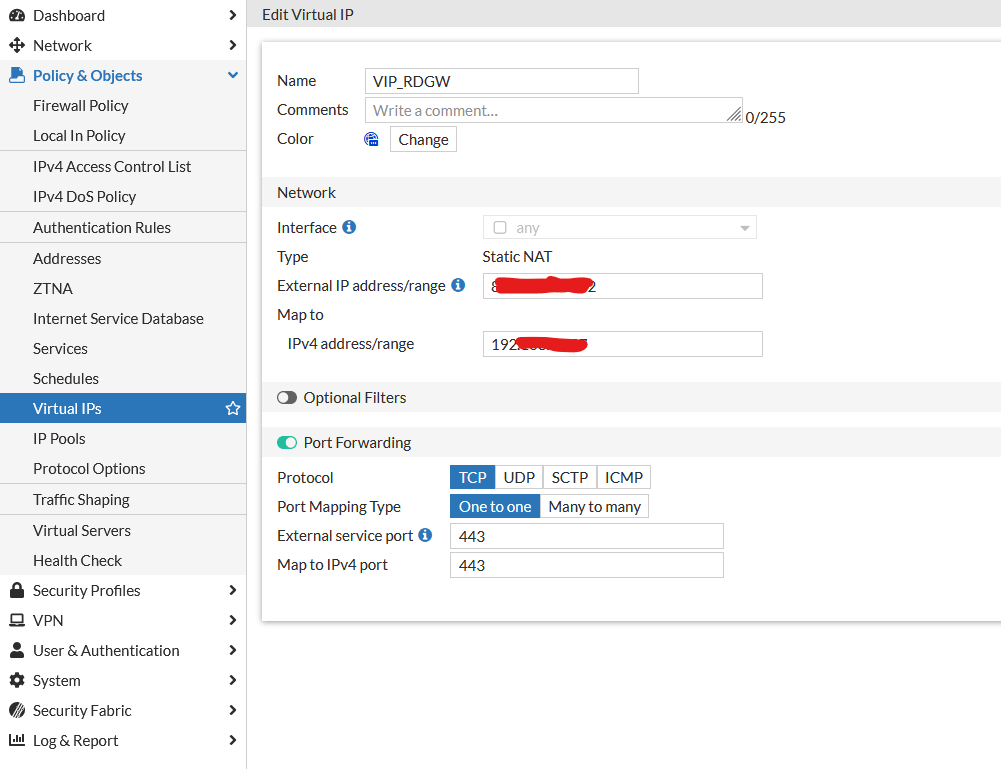
I created a simple Virtual IP where I forwarded port 443 on public IP to 443 on internal IP:
After that I created Firewall Policy rule:
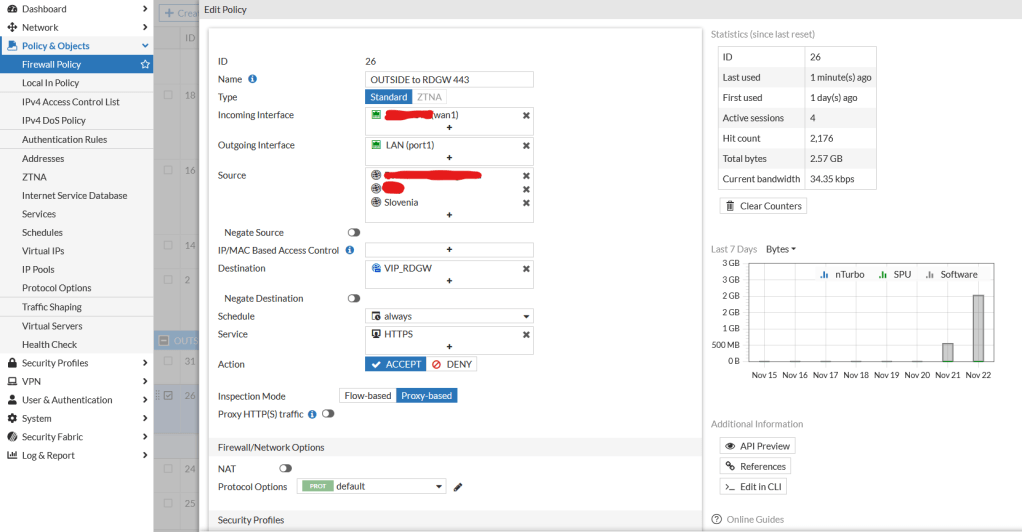
The important part comes here at SSL Inspection:
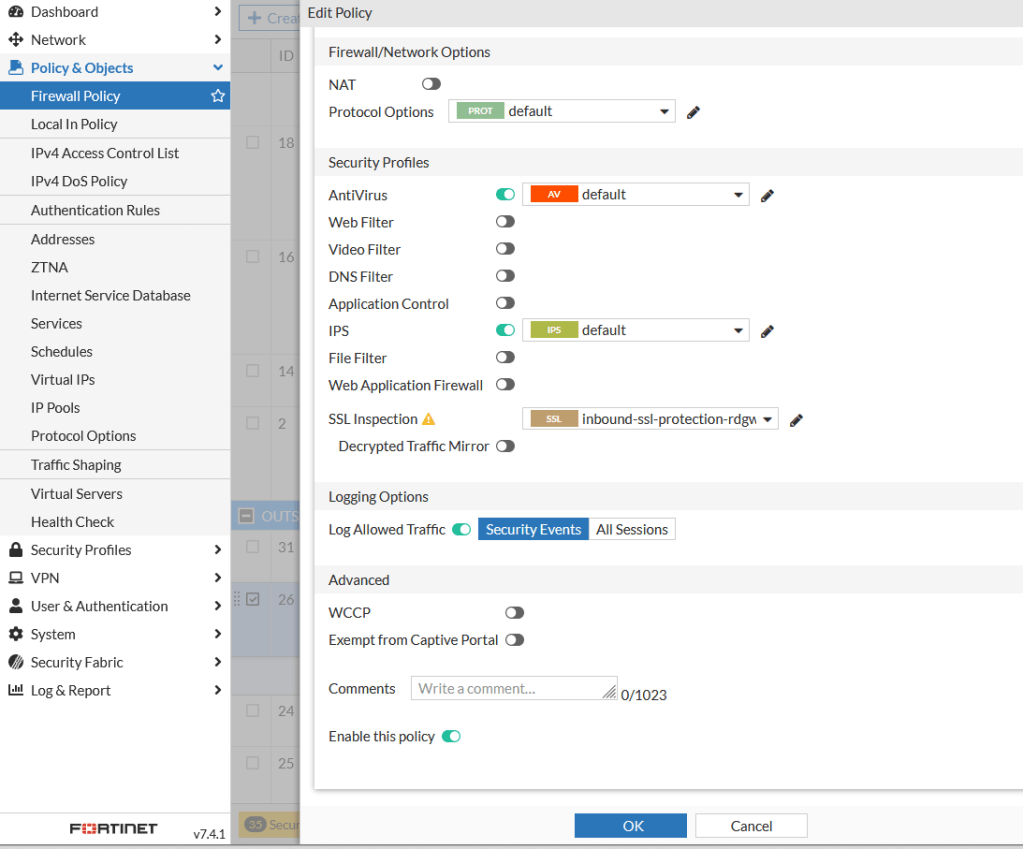
As you can see I am using two certificates (automatically generated with Let’s Encrypt using Fortigate) with not only multiple subject names on same domain but even different TLD.

There is a (small) trick – you need to enable RCP over HTTP on Fortigate for Remote Desktop Gateway functionality to work – and it is done in command line:
config firewall profile-protocol-options
edit 0
set rpc-over-http enable
end
After that you are ready to establish Remote Desktop Connection over Remote Desktop Gateway that is published via Fortigate with certificates that are automatically renewed by Fortigate.
 Luka Manojlovic
Thanks for the blog- Is it possible to use vServer in FTG instead of VIP for forward port 443 to RDGW? we have multiple servers sharing port 443 and using vServer and HTTP vServer and a FW Policy forwarding port 443 to the respective servers via url
Also isn’t port UDP 3391 is also recommended by Microsoft for RDGW to be forwarded so that after HTTP connection, the traffic from Client RDP PC to RDGW to RDSH is shifted to UDP 3391?
Thx
LikeLike
Hello Luka,
thanks for sharing. But your way doesn’t work as expected. For FortiOS 7.2.10build1706, the RDGateway certificate must be the same as that in the SSL inspection rule.
RDGW: rdgw.internal.local FGT:rdgw.external.com -> FAIL
RDGW: rdgw.external.com FGT:rdgw.external.com -> OK
So it is not “real” SSL offloading. Correct me if I’m wrong, but all my tests with different certificates are failing. The remote desktop connection fails with “m_spHelper->ReadCreds failed’ in CAAClientAdapter” in Debuglog.
Which FortiOS version did you use to get this to work?
@Mansoor: Unfortunately, the FortiGate loadbalancer (reverse proxy) is still not able to handle RD-Gateway connections due to the lack of RDP cookie persistence.
https://community.fortinet.com/t5/Support-Forum/Load-Balancing-terminal-servers/m-p/52011
LikeLike
Hi! I am doing it with for example: v7.2.10 build1706 (Mature).
I found out that it works best in proxy (and not flow!) mode and important is to have (also a self-signed) certificate on your RDGW – the subject name does not matter – I did wildcard self signed and it works perfectly.
LikeLike
Hello, T
his is crazy… but something must be different in our setups.
My RDS deployment is Win2016 with Broker and RDGW on the same machine. There are five RD Session Hosts within the Remote Desktop collection.
The certificate for RDGateway and RD Web Services was created for the subject name: rds-gw.internal.local (self-signed). It is not a wildcard certificate.
For the external FQDN (subject name) rds-gw.my-external-domain.com, the FortiGate retrieves a Letsencrypt certificate.
Using your example settings I can connect to RD web services without any issues/certificate warnings. I can log in to the RDWeb website. Everything OK. (By the way, there is no other VIP for the RDP or HTTP protocols, only HTTPS like in your example.)
But when it comes to using the native Remote Desktop Client on Windows 10/11 with the settings:
Computer: rds-gw.internal.local
Use RemoteDesktop Gateway Server: rds-gw.my-external-domain.com
The connection is denied/aborted with error 0xC000035B on the RD Gateway server, according to: https://www.reddit.com/r/sysadmin/comments/y63otj/rd_gateway_new_ssl_cert_throws_up_0xc000035b_when/ -> cert missmatch
The same RDP connection works with our old load balancer/SSL offloader. That’s why I know the RD Gateway settings should be correct.
Do you see any differences between our setups?
Is ur external fqdn name covered by the (self-signed) wildcard certificate?
Did u import the self-signed wildcard certificate into the Fortigate?
thx
LikeLike
Well my RDGW is separated from other roles, that’s correct… I suggest that you contact me directly via e-mail and we make a short Teams or something so you can compare configuration… We will make it work! 🙂 Luka AT manojlovic.net
LikeLike
Hi Luka,
i found the cause. After your last answer, I checked all the properties of the RD Gateway Manager again and came across an unconfigured SSL bridging option. The default setting is “off,” which means HTTPS-TO-HTTPS. In this mode, the RD Gateway was unable to decrypt traffic for rds-gw.my-external-domain.com because the RD Gateway is bound to an internal self-signed certificate (rds-gw.internal.local).
So I changed it to HTTPS-TO-HTTP as a test and you won’t believe it^^ the RemoteDesktop connection from external works fine.
By the way, it now also works in a vServer configuration with SSL offloading mode “Full”. So you don’t even need port forwarding via VIP. However, there are restrictions on the vServer with the stripped-down ACME client for LetsEncrypt certificates on the FortiGate (no subject alternative names possible). If you want to use “http-host” as a load balancing method, you would have to obtain the LetsEncrypt-SAN-certificates via another ACME client and import them into the FortiGate. Otherwise, you unfortunately have to sacrifice one public IP per URL if you have to use the HTTPS standard port 443 for all URLs.
big thx for ur input/help.
LikeLike
Hi! Yes HTTPS-To-HTTP must be set there. Great to hear that you managed to make it work! Have a nice day!
LikeLike