In this part I will try to go through a scenario with really low probability except if you are damn’ unlucky 🙂
I would like to show the resiliency of Storage Spaces Direct in Campus Cluster scenario so what we are going to showcase in this demo is:
– first we will simulate failure of node 2 (N4) in Rack 2
– second – I will remove a healthy disk from node 1 (N3) in Rack 2
– third – I will simulate failure of second node (N3) in Rack 2 (the one that had one disk missing)
– fourth – I will simulate failure of node 2 (N2) in Rack 1 – so the only “survivor” will be node 1 (N1) in Rack 1 that will not continue to work as it will remain in minority – we will cover that scenario in part 3. 🙂
In this part I am introducing also Windows Admin Center to have a better view (even with some delay 🙂 ) of what is going on in the cluster.
So we are staring the scenario by checking Volumes via Windows Admin Center and getting through the disks that are available in our cluster (each of the four nodes have 8 disks dedicated to S2D solution).
At 0:53 I have done a dirty shutdown (Turn off) of N4 and you can see that it went into Isolated state before going into Down. And also virtual machine running on it went into Unmonitored state before being restarted on N2 (in Rack 1), so I am moving (by using Live Migration) it back to remaining node (N3) in Rack 2.

At 1:36 I am checking current situation with disks and I can see that only disks in N4 are missing (as that node is turned offf) but at 2:25 additional disk has “failed” in N3. But as we move to Volumes / Inventory we can see that all volumes are in state “Needs Repair” but with green checkmark so everything is still working and storage is available to workloads (VMs). I am also checking if VMs are online (I am pausing video for couple of seconds as VMC sometimes needs some time to show the console of the VM).
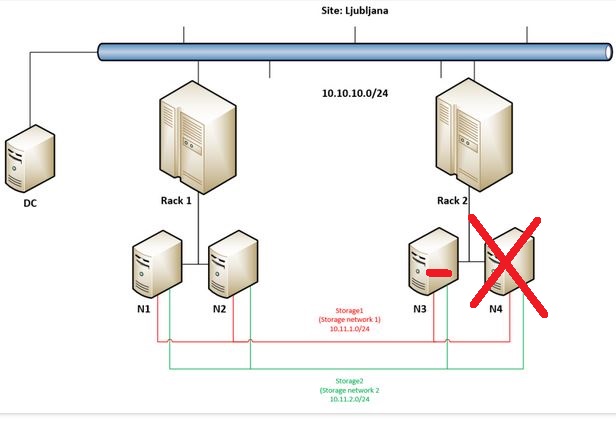
At 3:48 we can observe that also N3 so the remaining node in Rack 2 went offline (it become Isolated and later goes to status Down), VMs running on Rack 2 went into Unmonitored state and after approximately 10 seconds they are being restarted on nodes (N1 and N2) in Rack 1.
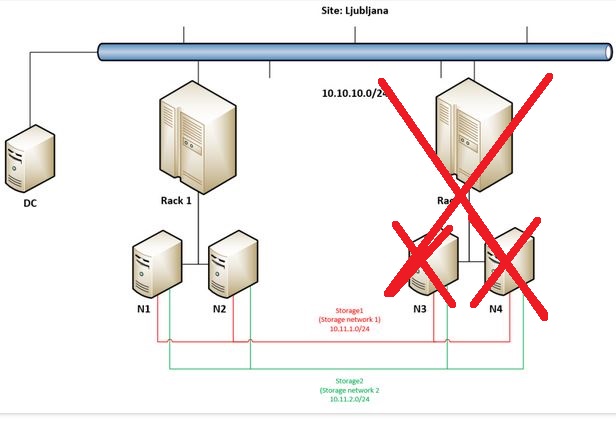
Everything is still working only all workloads (VMs) are now in Rack 1, and when I check Volumes / Inventory in Windows Admin Center we can still see that everything is green but needs repair.
In Drives we can see that half of available disks are missing (16 of 32) – the same, even with more details it can be seen in Drives Inventory.
Our Sysadmin is extremely unlucky today:
At approximately 4:58 another disastrous situation happen – N2 in Rack 1 fail. As there are four nodes in this cluster and there is only one node still available cluster stops working – you can see that I am not able to refresh Nodes or Roles in Failover Cluster Manager – Windows Admin Center is showing outdated situation as it can not connect to Cluster anymore.
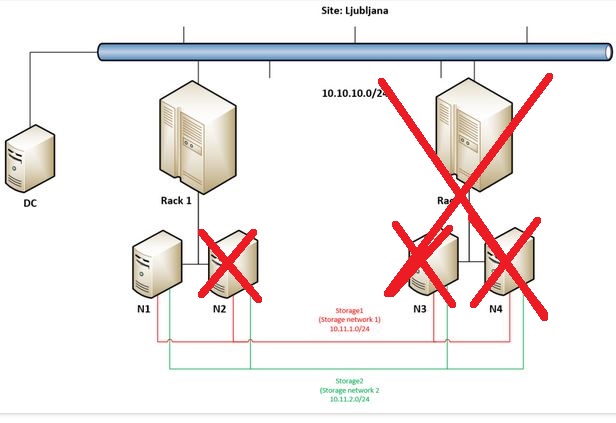
So in this part we will end here – but as we have setup Four Copy Cluster Shared Volumes (you can check it here) there should be still some hope for our data (spoiler alert: Yes!)? Follow me to the next part.
 Luka Manojlovic