Getting ASP.NET – C# running a System center Orchestartor 2012 Runbook and survive :)

I wanted to create ASP.NET webpage with three simple fields name, surname and mobile and I wanted Orchestrator behind to create Exchange 2010 mailbox on my Exchange server…
My friends helped me out by giving me suggestions and help – I want to share this knowledge with you now…

What we have:
Exchange 2010 server on one server
SC 2012 – Orchestrator – on different server – with Exchange 2010 console instaled + SP2 applied

My friend Saso created a ps1 script that creates user in Exchange 2010 (with address book policy, active sync policy…) that I use on Exchange 2010 server by inserting a line of comma separated values name,surname,password.

I wanted this script to be run from Orchestrator server – so first thing you need to do if you want to run PS script against Exchange 2010 server you need to install Exchange 2010 console on Orchestartor! Hey! You need to install also SP2 if you want full functionality of Exchange Powershell Snapin!

You can not run Exchange Snapin and powershell scripts directly – Jure has more info how you can do it in Orchestrator

When this thing worked (I forgot SP2 for Exchange 2010 on Orchestrator and I lost 2 hours to figure it out! 🙂 ) I have started to write code for my website where I want to trigger my runbook with parameters…

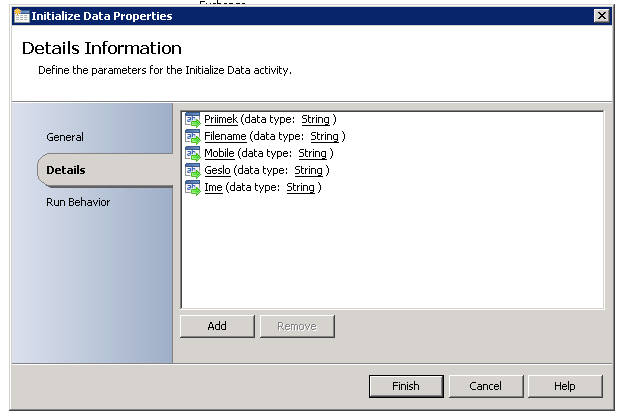
I have fist set input parameters in my Runbook…
After that I have folowed this article to create costum class file (search for part Creating the custom interface).

So I created scorch.sc (name it however you want in a previous step) and imported it in my Visual Studio evironment…

You need to place it:

You should comment this line to get it work in your project…

and finaly you can go to your project and start coding…

1. Put the URL of your Orch web service
2. Enter credentials
3. Define the name of your runbook
4. runbookpars [X] – X is ID of the input parameter in rubook

and finaly you should be able to run your script…
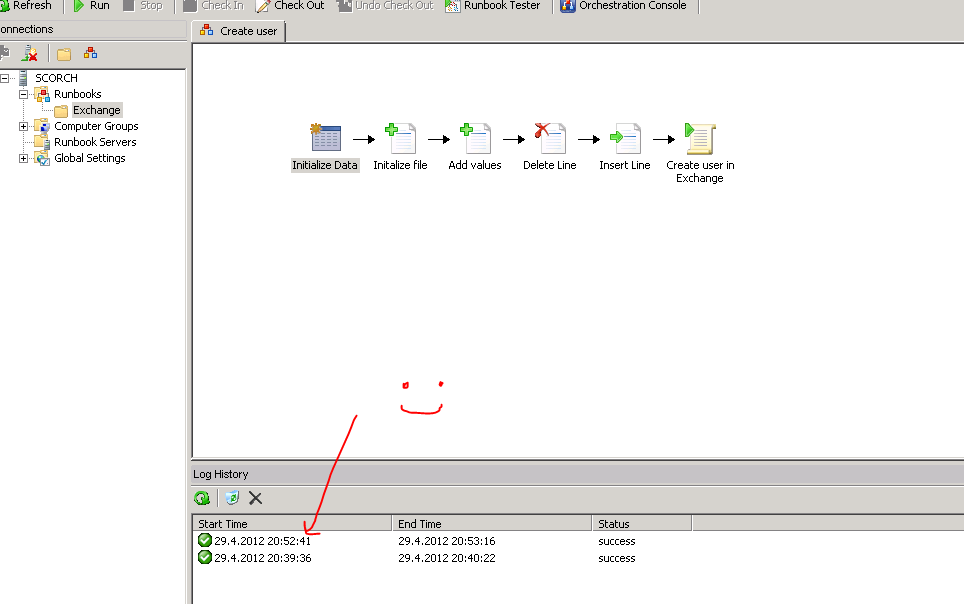
I find System center Orchestator 2012 as fantastic product that can realy help you automate your IT processes…

So guys let’s automate! 🙂

Help:
http://msdn.microsoft.com/en-us/library/hh921685.aspx – thanks to Damien
http://blogs.technet.com/b/neilp/archive/2012/02/14/sql-cluster-with-custom-front-end.aspx
http://www.purgar.net/category/orchestrator/ – thanks to Jure
voodoo C# help – thanks to Miha

Change time sync interval in Windows server 2008 (R2)…

During regular check of my Hyper-V hosts (Windows servers 2008 (R2)) I have seen that some of them have time out of sync even if all of them have configured external NTP source (I am using pool.ntp.org – in my case si.pool.ntp.org (Slovenian pool))…

But by default Windows is making NTP query and correction every 7 days (604800 seconds :))…

Well as NTP query is from network prospective small / light I have decided to make this check and sync once per hour… (3600 seconds)…

Well where do we set up this?

The key that you need to change is located in:

HKEY_LOCAL_MACHINESYSTEMCurrentControlSetServices
W32TimeTimeProvidersNtpClientSpecialPollInterval

Change from 604800 to 3600 (1 hour for example)… And restart Windows Time service

You can check snapshots on:
https://skydrive.live.com/?cid=38C674F31C0CB95C&id=38C674F31C0CB95C%212390#cid=38C674F31C0CB95C&id=38C674F31C0CB95C%212391


SloWUG NG – goriška IT pro uporabniška skupina…

Pa smo jo zagnali! Vabljeni vsi, ki se profesionalno ali za hobi ukvarjate z administracijo IT sistemov pa tudi tisti, ki vas zene zelja po novih znanjih, novih izkušnjah, pogovorih in druzenju z ljudmi, ki se ukvarjajo s podobnimi stvarmi kot vi…

SloWUG NG je “hčerinska” skupnost skupnosti SloWUG (http://www.slowug.si). SloWUG v Ljubljani ze vrsto let na srečanjih združuje ITjevce iz celotne Slovenije…
Podobno zgodbo zelimo začeti tudi v drugih mestih po Sloveniji in tako je nastala tudi skupnost SloWUG NG (http://ng.slowug.si), kjer se bomo enkrat na mesec srečevali na različnih lokacijah v Novi Gorici in prisluhnili dvem ali trem predavateljem, ki bodo predstavili novosti, rešitve ali pa kakšen praktičen primer iz vsakdanjega dela.

Srečanja so brezplačna in namenjena širitvi znanj, sklepanju novih prijateljstev in morda tudi novih poslovnih sodelovanj.

Vabljeni torej 15.11.2011 v prostore Primorskega tehnološkega parka… Več informacij na http://ng.slowug.si

Se vidimo!

Hyper-V virtual machine backup script…

Today my friend Marko Cepe sent me his VBS script that does great job to backup virtual machines that are running on Hyper-V.
This script does shut down virtual machine by sending shut down command to machine using integration services, then it waits virtual machine to enter stopped state, after that it does export of the machine and turns the machine back on.

Usage:

C:SKRIPTE> ExportVM.vbs VMName ExportDirectory

Example:

C:SKRIPTE> ExportVM.vbs TestVM X:BackupTestVM

Click, download and enjoy the script.

Comments appreciated…

Small business environments and backup – HP RDX backup solution

In SBS enviroments there is always problem with backup solutions that are afordable and reliable at the same time. HP has an excelent, quick and robust solution that you can easily implement in SBS environment. It’s called HP RDX and you can check HP website for more info – it is composed of internal or external device and hard disk based cartridge of different sizes. It allows you to copy at a speed between 20-35 MB/s or better around 100 GB / hour…

http://h10010.www1.hp.com/wwpc/us/en/sm/WF05a/12169-304616-3755725-3755725-3755725-3741006.html

http://www.youtube.com/watch?v=e5E1c0VrMyg

If you have virtualised SBS environment so you are running SBS 2008 or SBS 2011 on Hyper-V platform you can backup your SBS server by using iSCSI on Hyper-V host (you can try http://www.starwindsoftware.com/ with their fantastic iSCSI solution). When you have this software installed you can connect your RDX drive to your guest SBS server and use it to perform standard SBS backup on it.
This kind of solution will not work with Microsoft iSCSI target 3.3 (this is MS free iSCSI target that runs on Windows server 2008 R2) as it does not allow to use removable disks as source for iSCSI target disks (it only supports non-removable drives).